Love your image workflow.
Derivv Pro automates your image workflow so you can focus on creating.
Available for Mac, Windows, and Linux.

From source to shipped
Your whole image pipeline, in one app
Pull images in from anywhere, process them locally with precision, and deliver them wherever they need to go. No round trips, no busywork, just the finished images.
- Bring images in from anywhere
Drag and drop, point the CLI at a folder, or scan any web page with the browser extension. It grabs the sharpest source from srcset automatically.
- Set it once, run it on thousands
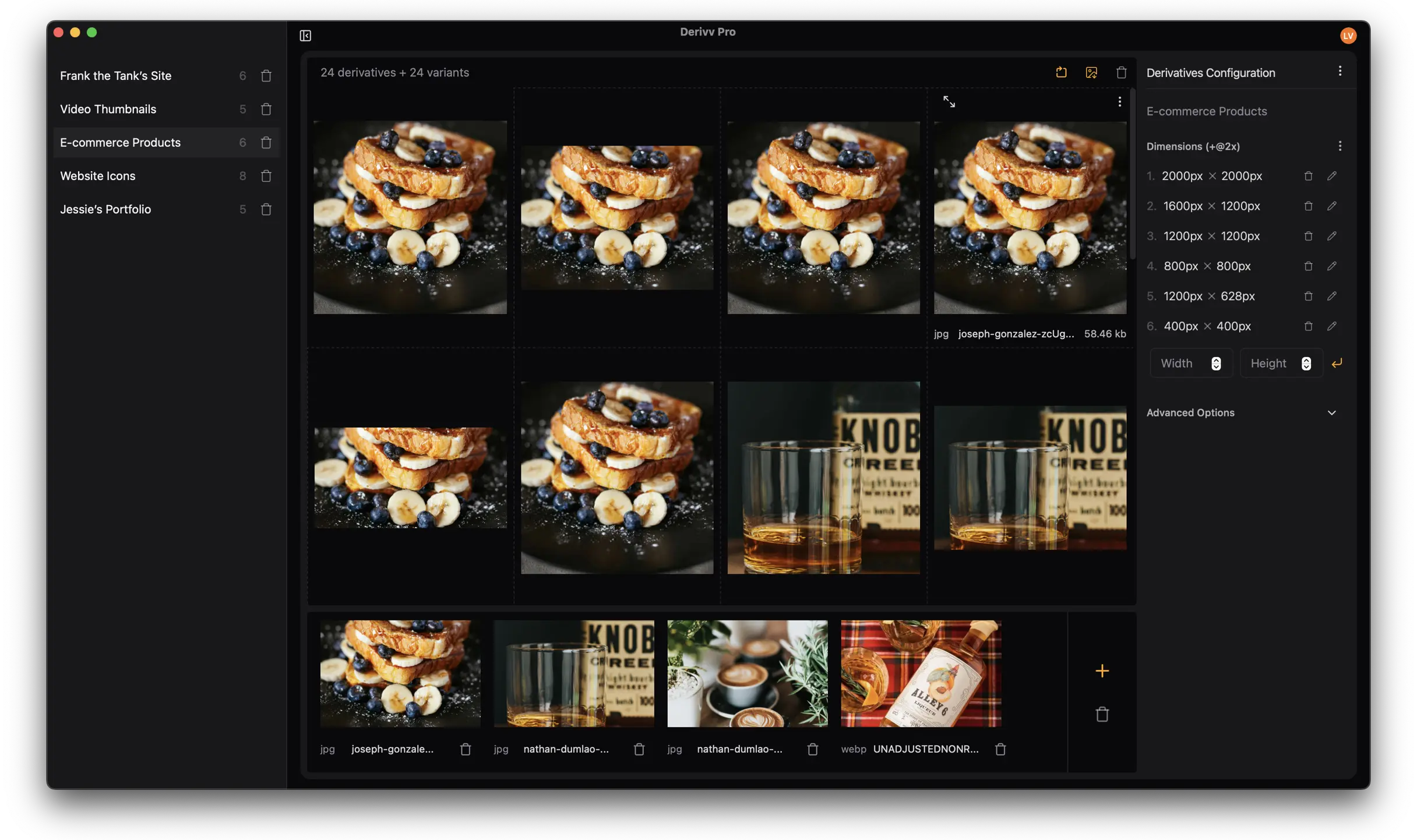
Save presets for your sizes, formats, quality, crop, and naming. Process a single image or ten thousand with the exact same recipe.
- Smart crop keeps the subject
Focal-point and face detection frame every crop automatically, or drag to fine-tune to the pixel. Need more resolution? AI upscaling has you covered.
- Modern formats, smaller files
Export AVIF, WebP, JPEG, and PNG at the quality you choose, plus print-ready DPI and 2x/3x variants when you need them.
- Ship straight to production
Publish to S3, Cloudflare R2, DigitalOcean Spaces, or WordPress, or export neatly organized folders and zips. No middle step.
- Automate from the command line
Batch and watch folders headlessly with the derivv CLI. Wire it into your own scripts and workflows, or let AI do it for you. AI loves the command line.
Reduce tedious work
Resizing images matters—it just shouldn't be tedious. When you're resizing similar files repeatedly, Derivv Pro's saved presets eliminate the configuration hassle so you can get it done quickly.
- Stop redoing the same setup.
- Save a preset once with your sizes, formats, quality, crop, and naming. Every future export uses it. No re-entering dimensions, ever.
- Start from a template.
- Built-in presets for e-commerce, social, and thumbnails get you going in seconds. Tweak them, or build your own from scratch.
- Land the focal point every time.
- Smart crop frames faces and subjects automatically. When you want the final say, drag to nudge it to the exact pixel.
“I literally can't program photoshop to do this.”
No export-and-upload dance
Ship straight to production
Connect your storage or CMS once and send finished images there in a click. Layouts, naming, and folders carry through automatically.
- Amazon S3
- Cloudflare R2
- DigitalOcean Spaces
- WordPress
- Organized folders
- Zip bundles
Try it risk-free
Try Derivv Pro for 30 days. If you don’t like it, you can easily cancel.
Derivv Pro
Get regular updates and direct support for as long as you need it. Have a team? Add your organization at signup — per-seat billing on one bill. Looking for an education plan? Reach out.
What’s included
- Bring images in from anywhere
- Save presets, run them on thousands
- Smart crop that keeps the subject
- Modern formats, smaller files
- Ship straight to production
- 100% on your machine
30-day free trial
$15/moUSD · per person
Start trialCancel any time. You’ll get a reminder when your trial is nearly over.
Prefer to pay once? Founders Edition — $199, lifetime.
If you liked the free version this much, you'll love Derivv Pro.
People love Derivv Classic so much they've left kind words on Ko-fi and Buy-Me-A-Coffee.
Frequently asked questions
If you have anything else you want to ask, reach out.
Does Derivv upload images to the cloud?
Derivv Pro only processes images on your machine. It does not upload any images to the cloud for processing.
Do you provide educational discounts?
Yes! Reach out and we'll get you set up.
Is there a free version?
Derivv Classic is a free version that allows you to resize and crop one image to multiple sizes.
Is there a Windows version?
Yes! Derivv Pro is available for Windows and is signed with Azure Trusted Signing.
What file types are supported?
Derivv Pro reads JPEG, PNG, WebP, and TIFF, and exports JPEG, PNG, WebP, and AVIF — with more formats on the way.
Can I buy the app without a subscription?
Yes — the Founders Edition is a one-time $199 purchase with lifetime access. 100 seats total, available through September 17, 2026.
Built by HatchMatter
Derivv Pro and Derivv Classic were designed and built with in Sonoma County, California by HatchMatter—a product studio for creatives.